

Step 1: Invite Your Students
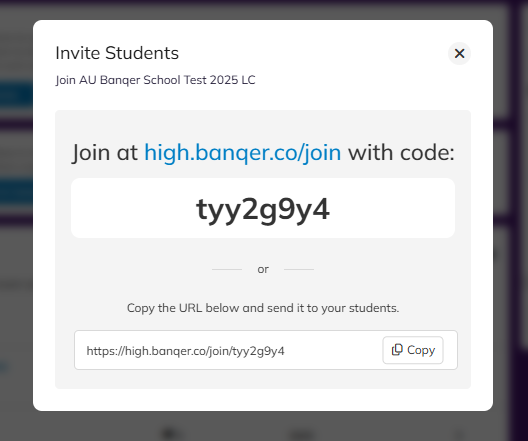
On your Teacher Dashboard, you'll find an Invite Students button at the top right of your Students area.
You can invite your students either using the code option, where the students will enter the following link high.banqer.co/join into their browser, and you will give them your classroom code. You can also display this on your screen at the front of the class to make it even easier.
OR
You can copy the URL link shown and ask the students to follow this.
Step 2: Students Set Up Their Accounts
Students will follow your chosen method above and then start setting up their account. They only need to enter:
1. Their name
2. Their school email address
Top Tip 💡: Encourage students to copy and paste their email address or double-check for typos. Incorrect email addresses are the most common setup issue and will prevent students from receiving the verification email needed to activate their account.
The link students will use in the future to log in from is - high.banqer.co/login
Top Tip 2 💡: If you have students who are struggling and have not received their confirmation emails, you can manually confirm these students so they can continue and log into your class.
See a quick step-by-step guide below on how to confirm student emails:
Step 3: Troubleshooting
If a student enters their email address incorrectly then they won't receive any confirmation email. Best practice here is to take a look at your Student list area, and determine if the email address entered is incorrect. If it is incorrect:
1. Delete their account from your dashboard.
2. Ask them to use the invitation link again to set up their account, ensuring that their email address is entered correctly.
Please see the guide below on how to delete a student from your Overview area.
Password Assistance
If students forget their password:
They can use the Forgot Password option to reset it themselves.
If this doesn’t work, you can reset their password from your Student Overview area.
Please see the guide below for visuals on how to edit a students password.
You are now ready to get started with your first lesson!
We have a really handy lesson plan around introducing financial literacy and some useful activities to go through which your class, which you can find here. You might find this easier to do ahead of setting your students up, or once they are set up.